
Computational as a third pillar of science (next to experimental and theoretical) is steadily developing in many fields of science. Even some fields you would less expect it, such as sociology or psychology. In other fields such as physics, chemistry or biology it is much more widespread, with people pushing the boundaries of what is possible. Larger facilities provide access to larger problems to tackle. If a computational physicist is asked if larger infrastructures would not become too big, he’ll just shrug and reply: “Don’t worry, we will easily fill it up, even a machine 1000x larger than that.” An example is given by a pair of physicists who recently published their atomic scale study of the HIV-1 virus. Their simulation of a model containing more than 64 million atoms used force fields, making the simulation orders of magnitude cheaper than quantum mechanical calculations. Despite this enormous speedup, their simulation of 1.2 µs out of the life of an HIV-1 virus (actually it was only the outer skin of the virus, the inside was left empty) still took about 150 days on 3880 nodes of 16 cores on the Titan super computer of Oak Ridge National Laboratory (think about 25 512 years on your own computer).
In Flanders, scientist can make use of the TIER-1 facilities provided by the Flemish Super Computer (VSC). The first Tier-1 machine was installed and hosted at Ghent University. At the end of it’s life cycle the new Tier-1 machine (Breniac) was installed and is hosted at KULeuven. Although our Tier-1 supercomputer is rather modest compared to the Oak Ridge supercomputer (The HIV-1 calculation I mentioned earlier would require 1.5 years of full time calculations on the entire machine!) it allows Flemish scientists (including myself) to do things which are not possible on personal desktops or local clusters. I have been lucky, as all my applications for calculation time were successful (granting me between 1.5 and 2.5 million hours of CPU time every year). With the installment of the new supercomputer accounting of the requested resources has become fully integrated and automated. Several commands are available which provide accounting information, of which mam-balance is the most important one, as it tells how much credits are still available. However, if you are running many calculations you may want to know how many resources you are actually asking and using in real-time. For this reason, I wrote a small bash-script that collects the number of requested and used resources for running jobs:
[codesyntax lang="bash" lines="normal" blockstate="collapsed"]
#small script to collect TIER-1 usage and requested resources
#!/bin/bash
echo "(c) dannyvanpoucke.be"
echo "          _____"
echo "          \0.0/"
echo "          ( o )"
echo "           ^-^ "
echo " Collecting Tier-1 requested/used resources: Breniac "
echo "-----------------------------------------------------"

#step one running resources
RCRrt="0"
RCRwt="0"
tnodes="0"
numl=`qstat -n | grep " R " | wc -l`
for (( i=1 ; i<= $numl ; i++ )); do
lin=`qstat -n | grep " R " | head -$i | tail -1`
nodes=`echo $lin | awk '{print $6}'`
tnodes=$( echo "$tnodes + $nodes" | bc )
lin=`echo $lin | sed 's/:/\ /g'`
rth=`echo $lin | awk '{print $13}'`
rtm=`echo $lin | awk '{print $14}'`
rts=`echo $lin | awk '{print $15}'`
wth=`echo $lin | awk '{print $9}'`
wtm=`echo $lin | awk '{print $10}'`
wts=`echo $lin | awk '{print $11}'`

rtuse=$( bc -l << EOF
scale=4
$nodes * (($rth + ( $rtm + ( $rts / 60.0000 ) )/60.0000)/24.00)
EOF
)
wtuse=$( bc -l << EOF
scale=4
$nodes * (($wth + ( $wtm + ( $wts / 60.0000 ) )/60.0000)/24.00)
EOF
)
RCRrt=$( bc -l << EOF
scale=4
$RCRrt + $rtuse
EOF
)
RCRwt=$( bc -l << EOF
scale=4
$RCRwt + $wtuse
EOF
)
done

echo " RESOURCES CURRENTLY RUNNING:"
echo "------------------------------"
echo " Number of running jobs : "$numl" ($tnodes nodes)"
echo " Resources in play (used/request): $RCRrt / $RCRwt nodedays"
echo " "
#step two queued resources

RCQwt="0"
numl=`qstat -n | grep " Q " | wc -l`
for (( i=1 ; i<= $numl ; i++ )); do
lin=`qstat -n | grep " Q " | head -$i | tail -1`
nodes=`echo $lin | awk '{print $6}'`
lin=`echo $lin | sed 's/:/\ /g'`
wth=`echo $lin | awk '{print $9}'`
wtm=`echo $lin | awk '{print $10}'`
wts=`echo $lin | awk '{print $11}'`

wtuse=$( bc -l << EOF
scale=4
$nodes * (($wth + ( $wtm + ( $wts / 60.0000 ) )/60.0000)/24.00)
EOF
)

RCQwt=$( bc -l << EOF
scale=4
$RCQwt + $wtuse
EOF
)
done

echo " RESOURCES CURRENTLY QUEUED:"
echo "------------------------------"
echo " Number of queued jobs : "$numl
echo " Resources requested   : $RCQwt nodedays"
echo " "

#step three used resources in ended jobs
cnt="0"
RCFrt="0"
RCFwt="0"
numl=`qstat | grep " C " | wc -l`
#mam-statement does give the ID's but no further info can be extracted from qstat.
#numl=`mam-statement | grep $project | grep 'UsageRecord' | wc -l`
# list of jobIDs
LST=`qstat | grep " C " | sed 's/\./\ /g' | awk '{print $1}'`
#LST=`mam-statement | grep $project | grep 'UsageRecord' | awk '{print $3}'`

for jobid in `echo $LST`; do
#check if the job actually ran
tst=`qstat -f $jobid | grep 'walltime' | wc -l`
if [ "$tst" == "2" ]; then
nodes=`qstat -f $jobid | grep nodect | awk '{print $3}'`
lin=`qstat -f $jobid | grep 'resources_used.walltime' | awk '{print $3}' | sed 's/:/\ /g'`
rth=`echo $lin | awk '{print $1}'`
rtm=`echo $lin | awk '{print $2}'`
rts=`echo $lin | awk '{print $3}'`
lin=`qstat -f $jobid | grep 'Resource_List.walltime' | awk '{print $3}' | sed 's/:/\ /g'`
wth=`echo $lin | awk '{print $1}'`
wtm=`echo $lin | awk '{print $2}'`
wts=`echo $lin | awk '{print $3}'`

rtuse=$( bc -l << EOF
scale=4
$nodes * (($rth + ( $rtm + ( $rts / 60.0000 ) )/60.0000)/24.00)
EOF
)
wtuse=$( bc -l << EOF
scale=4
$nodes * (($wth + ( $wtm + ( $wts / 60.0000 ) )/60.0000)/24.00)
EOF
)

RCFrt=$( bc -l << EOF
scale=4
$RCFrt + $rtuse
EOF
)
RCFwt=$( bc -l << EOF
scale=4
$RCFwt + $wtuse
EOF
)

else
# if the job didn't run
cnt=$(bc -l << EOF
scale=0
$cnt + 1
EOF
)
fi
done

pct=$( bc -l << EOF
scale=3
 ( $RCFrt / $RCFwt ) * 100.00
EOF
)

#remove the number of not-run jobs
numl=$(bc -l << EOF
scale=0
$numl - $cnt
EOF
)

echo " RESOURCES RECENTLY COMPLETED JOBS:"
echo "-------------------------------------"
echo " Number of jobs not run : "$cnt
echo " Number of compled jobs : "$numl
echo " Resources used   : $RCFrt / $RCFwt nodedays"
echo " This is "$pct" % of the requested resources."
echo " "

# finish with the Balance
mam-balance
[/codesyntax]
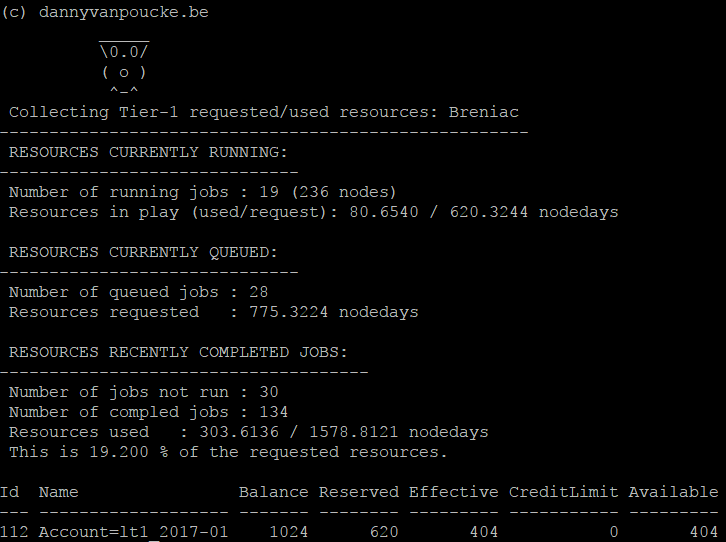
Output of the Bash Script.
Currently, the last part, on the completed jobs, only provides data based on the most recent jobs. Apparently the full qstat information of older jobs is erased. However, it still provides an educated guess of what you will be using for the still queued jobs.