Category: blog

Fortran dll’s and libraries: a Progress bar

In the previous fortran tutorials, we learned the initial aspects of object oriented programming (OOP) in fortran 2003. And even though our agent-based opinion-dynamics-code is rather simple, it can quickly take several minutes for a single run of the program to finish. Two tools which quickly become of interest for codes that need more than a few minutes to run are: (1) a progress bar, to track the advance of the “slow” part of the code and prevent you from killing the program 5 seconds before it is to finish, and (2) a timer, allowing you to calculate the time needed to complete certain sections of code, and possibly make predictions of the expected total time of execution.

In this tutorial, we will focus on the progress bar. Since our (hypothetical) code is intended to run on High-Performance Computing (HPC) systems and is written in the fortran language, there generally is no (or no easy) access to GUI’s. So we need our progress bar class to run in a command line user interface. Furthermore, because it is such a widely useful tool we want to build it into a (shared) library (or dll in windows).progress_1pct

The progress bar class

What do we want out of our progress bar? It needs to be easy to use, flexible and smart enough to work nicely even for a lazy user. The output it should provide is formatted as follows: <string> <% progress> <text progress bar>, where the string is a custom character string provided by the user, while ‘%progress’ and ‘text progress bar’ both show the progress. The first shows the progress as an updating number (fine grained), while the second shows it visually as a growing bar (coarse grained).

[codesyntax lang=”fortran” lines=”normal” title=”TProgressBar Class” bookmarkname=”PBarClass” blockstate=”expanded” doclinks=”0″]

type, public :: TProgressBar
        private
        logical :: init
        logical :: running
        logical :: done
        character(len=255) :: message
        character(len=30) :: progressString
        character(len=20) :: bar
        real :: progress
    contains
        private
        procedure,pass(this),public :: initialize
        procedure,pass(this),public :: reset
        procedure,pass(this),public :: run
        procedure,pass(this),private:: printbar
        procedure,pass(this),private:: updateBar
    end type TProgressBar

[/codesyntax]

All properties of the class are private (data hiding), and only 3 procedures are available to the user: initialize, run and reset. The procedures, printbar and updatebar are private, because we intend the class to be smart enough to decide if a new print and/or update is required. The reset procedure is intended to reset all properties of the class. Although one might consider to make this procedure private as well, it may be useful to allow the user to reset a progress bar in mid progress.(The same goes for the initialize procedure.)

[codesyntax lang=”fortran” lines=”normal” title=”Run procedure of the TProgressBar class” blockstate=”expanded” bookmarkname=”RunProcedure” ]

subroutine run(this,pct,Ix,msg)
        class(TProgressBar) :: this
        real::pct
        integer, intent(in), optional :: Ix
        character(len=*),intent(in),optional :: msg

        if (.not. this%init) call this%initialize(msg)
        if (.not. this%done) then
            this%running=.true.
            this%progress=pct
            call this%updateBar(Ix)
            call this%printbar()
            if (abs(pct-100.0)<1.0E-6) then
                this%done=.true.
                write(*,'(A6)') "] done"
            end if
        end if

    end subroutine run

[/codesyntax]

In practice, the run procedure is the heart of the class, and the only procedure needed in most applications. It takes 3 parameters: The progress (pct), the number of digits to print of pct (Ix),and the <string> message (msg). The later two parameters are even optional, since msg may already have been provided if the initialize procedure was called by the user. If the class was not yet initialized it will be done at the start of the procedure. And while the progress bar has not yet reached 100% (within 1 millionth of a %) updates and prints of the bar are performed. Using a set of Boolean properties (init, running, done), the class keeps track of its status. The update and print procedures just do this: update the progress bar data and print the progress bar. To print the progress bar time and time again on the same line, we need to make use of the carriage return character (character 13 of the ASCII table):

write(*,trim(fm), advance='NO') achar(13), trim(this%message),trim(adjustl(this%progressString)),'%','[',trim(adjustl(this%bar))

The advance=’NO‘ option prevents the write statement to move to the next line. This can sometimes have the unwanted side-effect that the write statement above does not appear on the screen. To force this, we can use the fortran 2003 statement flush(OUTPUT_UNIT), where “OUTPUT_UNIT” is a constant defined in the intrinsic fortran 2003 module iso_fortran_env. For older versions of fortran, several compilers provided a (non standard) flush subroutine that could be called to perform the same action. As such, we now have our class ready to be used. The only thing left to do is to turn it into a dll or shared library.progress_25pct

How to create a library and use it

There are two types of libraries: static and dynamic.

Static libraries are used to provide access to functions/subroutines at compile time to the library user. These functions/subroutines are then included in the executable that is being build. In linux environments these will have the extension “.a”, with the .a referring to archive. In a windows environment the extension is “.lib”, for library.

Dynamic libraries are used to provide access to functions/subroutines at run time. In contrast to static libraries, the functions are not included in the executable, making it smaller in size. In linux environments these will have the extension “.so”, with the .so referring to shared object. In a windows environment the extension is “.dll”, for dynamically linked library.

In contrast to C/C++, there is relatively little information to be found on the implementation and use of libraries in fortran. This may be the reason why many available fortran-“libraries” are not really libraries, in the sense meant here. Instead they are just one or more files of fortran code shared by their author(s), and there is nothing wrong with that. These files can then be compiled and used as any other module file.

So how do we create a library from our Progressbar class? Standard examples start from a set of procedures one wants to put in a library. These procedures are put into a .f or .f90 file. Although they are not put into a module (probably due to the idea of having compatibility with fortran 77) which is required for our class, this is not really an issue. The same goes for the .f03 or .f2003 extension for our file containing a fortran 2003 class. To have access to our class and its procedures in our test program, we just need to add the use progressbarsmodule clause. This is because our procedures and class are incorporated in a module (in contrast to the standard examples). Some of the examples I found online also include compiler dependent pragmas to export and import procedures from a dll. Since I am using gfortran+CB for development, and ifort for creating production code, I prefer to avoid such approaches since it hampers workflow and introduces another possible source of bugs.

The compiler setups I present below should not be considered perfect, exhaustive or fool-proof, they are just the ones that work fine for me. I am, however, always very interested in hearing other approaches and fixes in the comments.progress_52pct

Windows

The windows approach is very easy. We let Code::Blocks do all the hard work.

shared library: PBar.dll

Creating the dll : Start a new project, and select the option “Fortran DLL“. Follow the instructions, which are similar to the setup of a standard fortran executable. Modify/replace/add the fortran source you wish to include into your library and build your code (you can not run it since it is a library).

Creating a user program : The program in which you will be using the dll is setup in the usual way. And to get the compilation running smoothly the following steps are required:

  • Add the use myspecificdllmodule clause where needed, with myspecificdllmodule the name of the module included in the dll you wish to use at that specific point.
  • If there are modules included in the dll, the *.mod files need to be present for the compiler to access upon compilation of the user program. (Which results in a limitation with regard to distribution of the dll.)
  • Add the library to the linker settings of the program (project>build options>linker settings), and then add the .dll file.
  • Upon running the program you only need the program executable and the dll.

static library

The entire setup is the same as for the shared library. This time, however, choose the “Fortran Library” option instead of Fortran dll. As the static library is included in the executable, there is no need to ship it with the executable, as is the case for the dll.

Unix

For the unix approach we will be working on the command line, using the intel compiler, since this compiler is often installed at HPC infrastructures.

static library: PBar.a

After having created the appropriate fortran files you wish to include in your library (in our example this is always a single file: PBar.f03, but for multiple files you just need to replace PBar.f03 with the list of files of interest.)

  1. Create the object files:
    ifort -fpic -c -free -Tf Pbar.f03

    Where -fpic tells the compiler to generate position independent code, typical for use in a shared object/library, while -c tells the compiler to create an object file. The -free and -Tf compiler options are there to convince the compiler that the f03 file is actual fortran code to compile and that it is free format.

  2. Use the GNU ar tool to combine the object files into a library:
    ar rc PBarlib.a PBar.o
  3. Compile the program with the library
    ifort TestProgram.f90 PBarlib.a -o TestProgram.exe

    Note that also here the .mod file of our Progressbarsmodule needs to be present for the compilation to be successful.

shared library: PBar.so

For the shared library the approach does not differ that much.

  1. Create the object files:
    ifort -fpic -c -free -Tf Pbar.f03

    In this case the fpic option is not optional in contrast to the static library above. The other options are the same as above.

  2. Compile the object files into a shared library:
    ifort -shared PBar.o -o libPBar.so

    The compiler option -shared creates a shared library, while the -o option allows us to set the name of the library.

  3. Compile the program with the library
    ifort TestProgram.f90 libPBar.so -o TestProgram.exe

    Note that also here the .mod file of our Progressbarsmodule needs to be present for the compilation to be successful. To run the program you also need to add the location of the library file libPBar.so to the environment variable LD_LIBRARY_PATH

One small pickle

HPC systems may perform extensive buffering of data before output, to increase the efficiency of the machine (disk-writes are the slowest memory access option)…and as a result this can sometimes overrule our flush command. The progressbar in turn will not show much progress until it is actually finished, at which point the entire bar will be shown at once. There are options to force the infrastructure not to use this buffering (and the system administrators in general will not appreciate this), for example by setting the compiler flag -assume nobuffered_stdout. So the best solution for HPC applications will be the construction of a slightly modified progress bar, where the carriage return is not used.

progress_100pct


Special thanks also to the people of stack-exchange for clarifying some of the issues with the modules.

Source files for the class and test-program can be downloaded here.


Permanent link to this article: https://dannyvanpoucke.be/fortran-dlls-en/

Stargazing at the ISS

What happens if two physicists take a holiday? They end up stargazing and hunting for the International Space Station (ISS). During the last week and a half we tried to capture the ISS flybys on camera nearly every night (with varying success). Each night we learned new things:

ISS and starscape

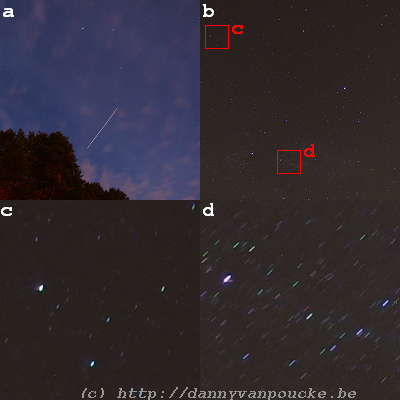
(a) Flyby of the ISS on August 4, 22h38 with a 20 second exposure, and ISO speed of 160. (b) Midnight starscape on august 5th (awaiting the ISS flyby) with a 60 second exposure at ISO-160. (c) and (d) zoomed in sections of (b) showing the color of the stars and arcs due to the earth rotation. (c) shows the a section of sky quite close to the north(small arcs). The arcs shown in (d) are about 15 arc-minute in size. (pictures by Sylvia Wenmackers)

  • Prolonged exposure photography makes night-sky pictures very interesting:
    • The overall sky quickly becomes overexposed (the least bit of final sunlight even after sunset, and the sky turn bright like it is midday, cf. picture (a))
    • Stars truly have colors you can see.(I’m a city boy, and even though as a physicist I am well aware of this it didn’t really fully register before I saw our long exposure pictures with stars in colors varying from green to bright blue(cf. pictures (c) & (d)).⇒And my mind went racing toward a funky programming project to estimate the star’s temperatures.)
    • During a 60 second exposure, the earth rotates 15 arc minutes which actually gives star-trails in our pictures…~7 pixels in the largest trails (cf. picture (d))
    • During a 60 second exposure you can see a hell of a lot of stars, compared to what you normally see (further comparison to the starscape you have living in a city, you could as well be blind).
  • The ISS flyby is very fast (at about 27600km/h), and appears to move faster across the sky than airplanes.
  • With only a few minutes to trace an entire arc through the sky (NASA’s webpage shows times up to 6 minutes, but in reality the local horizon such as trees or houses can significantly reduce this.) The number of attempts to make a prolonged expose picture is limited to 2 or 3 (at best).
  • With a size of ~100 m at an altitude of about 400 km the ISS has a relative size less than 1 arc-minute (or about 0.5 pixels)…so even with binoculars you are still looking at a very bright point.
  • Timing is everything…especially if there are also other satellites passing by, following about the same path, at about the same time, such as the Lacrosse 5 spy satellite. Luckily there are many websites which can provide information on ISS flybys [e.g. here and here(in Dutch)] or any other satellite [here].


Permanent link to this article: https://dannyvanpoucke.be/iss-gazing-en/

Jurassic World

Most kids love dinosaurs, or at some point in life have been intrigued by the idea of the large monsters among them. My inner child still does, so twenty-two years after having seen the original Jurassic Park movie, I watched the first three movies again with my girlfriend, as preparation for its most recent incarnation:Jurassic World.(JP4)

The movie starts from the same premise as the original one (building a theme-park with dinosaurs), but unlike the original, this theme-park is already up and running, and welcoming over 20.000 visitors a day. However, as the mathematician Dr. Ian Malcolm noted in Lost World:

Oh, yeah. Oooh, ahhh, that’s how it always starts. Then later there’s running and screaming.

and so it is in Jurassic world. Everything is peachy, until the genetically engineered Indominus Rex (or the King that can not be mastered/tamed) escapes and runs rampage on Isla Nublar. The representation of a commercialized dinosaur theme-park is scarily realistic: With a type of  kids-farm like section, where little children can hug small dinosaurs and ride baby Triceratops’s, shops selling merchandising, rides through the park and animal (feeding-)shows. Also the modern trend to use abstractions (as euphemisms) to describe negative experiences and events, turns out rather painfully realistic with the automated warning messages to inform the tourists of a “containment anomaly“, when in fact the aviary is breached and the escaped pterodactyls are about to start pecking the above tourists to death.

Continue reading

Permanent link to this article: https://dannyvanpoucke.be/jurassic-world-en/

Congratulations with your 100000000Bth follower Sylvia

For my favorite science-communicator and philosopher of science: Sylvia Wenmackers, congratulations with your 100000000Bth follower on twitter.

It all started just over 4 years ago with a blog on your own webpage, which quickly was accompanied by a blog on scilogs. This in turn lead to a column in EOS, and lately you have been expanding your influence through radio and newspaper (de standaard) contributions (as it is described in the scientific conference language). You are great at explaining things you are enthusiastic about ( something you showed during famelab Belgium) and an excellent writer (FQXi first-prize).

To measure your steep road to science-communicator fame I have a small present for you:

Small present.

Small present.

(Hint: It is not an ugly garden statue, for that you need two bits more 🙂 )

Permanent link to this article: https://dannyvanpoucke.be/sylvia-twitter256-en/

HIVE reaches 40K lines

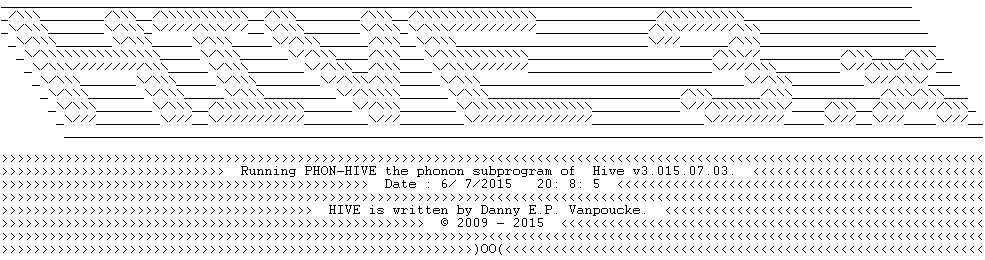
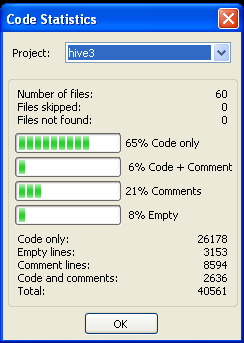
HIVE 3.x BannerCode statistics for HiveWith the inclusion of the phonon-module and some minor fixes and extensions to existing code, the hive 3.x program now counts over 40.000 lines, spread over 60 files. 8% of all lines are blank lines, 71% of all lines contain code, and 21% contain comments, an indication of the extent of the documentation of the code.

The code now provides access to 33 command line options of varying complexity. The simplest options (extracting a geometry, or creating a cif-file) are nearly instantaneous, while more complex options (such as Hirshfeld-I calculations) can take up to several hours.

Also from this point onward, HIVE will require to be linked with a lapack-library during compilation, to allow for the efficient solution of eigenvalue-problems.

Time for a little celebration.

Permanent link to this article: https://dannyvanpoucke.be/hive-40k-en/

Happy Tau-day

June 28th or 6/28 the first three digits of 2\pi aka \tau. In response to the creation of \pi-day (March  14th), June 28th was suggested as \tau-day to celebrate the number representing the ratio between the circumference of a circle and its radius. (And as with most opinions these days there needs to be a lot of controversy and discussion 😎 ) Having no religious preferences for either, I suggest to celebrate both, one with a single pie, and the other with two.

Permanent link to this article: https://dannyvanpoucke.be/happy-tau-day-2015-en/

Phonons: shake those atoms

In physics, a phonon is a collective excitation in a periodic, elastic arrangement of atoms or molecules in condensed matter, like solids and some liquids. Often designated a quasi-particle, it represents an excited state in the quantum mechanical quantization of the modes of vibrations of elastic structures of interacting particles.

— source: wikipedia

Or for simplicity: sound waves; the ordered shaking of atoms or molecules. When you hit a metal bell with a (small) hammer, or make a wineglass sing by rubbing the edges, you experience the vibrations of the object as sound. All objects in nature (going from atoms to stars) can be made to vibrate, and they do this at one or more specific frequencies : their eigenfrequencies or normal frequencies.

Also single molecules, if they are hit (for example by another molecule bumping into them) or receive extra energy in another way, start to vibrate. These vibrations can take many forms (elongating and shortening of bonds, rotating of parts of the molecule with respect to other parts, flip-flopping of loose ends, and so forth) and give a unique signature to the molecule since each of these vibrations (so-called eigen-modes) corresponds with a certain energy given to the molecule. As a result, if you know all the eigen-modes of a molecule, you also know which frequencies of infrared light they should absorb, which is very useful, since in experiment we do not “see” molecules (if we see them at all) as nice ball-and-stick objects.

From the computational point of view, this is not the only reason why in molecular modeling the vibrational frequencies of a system (i.e. the above eigen-modes) are calculated. In addition, they also tell if a system is in its ground state (which is what one is looking for most of the time) or not. Although this tool has wide-spread usage in molecular modeling, it is seldom used in ab initio solid state physics because of the associated computational cost. In addition, because of the finite size of the unit cell, the reciprocal space in which phonons live also has a finite size, in contrast to the single point for a molecule…making life complex. 😎

Continue reading

Permanent link to this article: https://dannyvanpoucke.be/phonons-shake-those-atoms-en/

Tutorial OOP(II): One problem, different possible classes

additional resources
agent paper: Sobkowicz
source-code: AgentTutorials
Arxiv: Full Tutorial

In the previous tutorial, we saw how to tackle an opinion dynamics problem using agents as a class in an Object Oriented Programming (OOP) approach. In many topics of interest in (socio-)physics and chemistry, we deal with a large number of particles, be it electrons, atoms, agents, stars, … These are contained in a superstructure (electrons⇒atom, atoms⇒molecule/solid, agents⇒population, stars⇒galaxy,…) which is generally represented in the code as an array. As we noted in the previous tutorial, there were several variables which were global to the agents, but we implemented them as properties of the agents anyhow. As a result, a significant amount of additional memory needed to be allocated for storing in essence the same data. This was done to prevent the need of having to provide this information at every function call.

Returning to our problem of interest, we now consider two object classes: The TAgent-class and the TPopulation-class. This leads to several possible ways this problem can be implemented.

  1. Array of TAgents: As was done in the previous tutorial, we only make a class of the agents, and put them in an array.
  2. TPopulation of TAgents: In this case we construct a class called TPopulation of which one property is the set of TAgents. The TPopulation-class also contains some of the global variables as properties, and operations on this set are methods of the TPopulation-class.
  3. TPopulation-class without TAgent-class: In this last case, the agents are dissolved, and their properties are stored in array-properties of the TPopulation-class. The methods of the TAgent-class now become methods of the TPopulation-class. And the global variables become additional properties of the TPopulation-class.

Although the true OOP-programmer may only consider the  second option the way to go, we will consider the third option in this tutorial.

Continue reading

Permanent link to this article: https://dannyvanpoucke.be/oop-fortran-tut3-en/

Fabulous Famelab

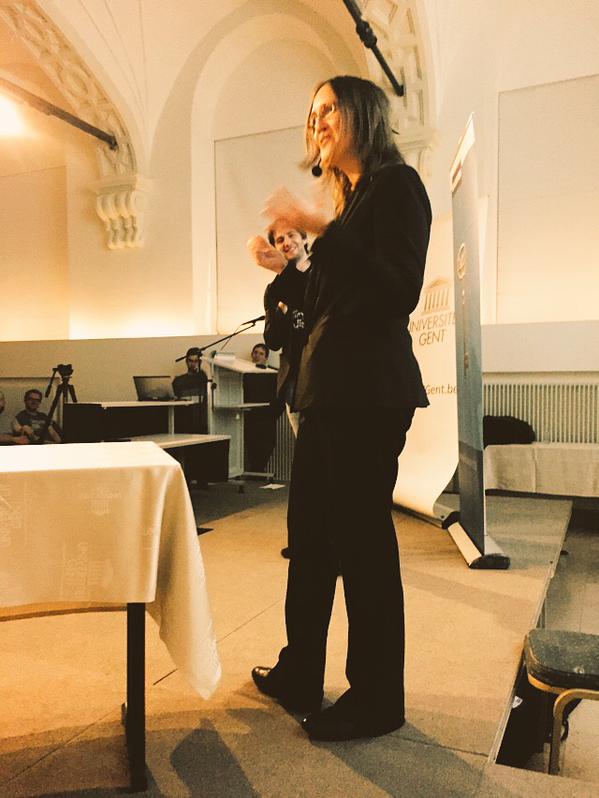
Sylvia convincing the jury at the Famelab heat in Ghent. (thanks to jury member Philippe Smet)

Sylvia convincing the jury at the Famelab heat in Ghent. (Thanks to jury member Philippe Smet)

These days, a scientist is no longer the lone researcher, hiding away in dark rooms and cellars, never coming out, except to ask a servant to mail a letter with his/her newest findings to a like-minded scholar hidden in some other dungeon. Nowadays, we have email to do the latter. In addition, “the scientist” has also had to become the inspiring teacher, the diligent administrator/manager, and the quick salesman/woman pitching his/her ideas for new project-funding. More recently, becoming a rock star was added to this list. (One may start to wonder when she/he should be doing research.)

Since 2005, Famelab, which is part of the Cheltenham Science Festival, has been a platform for young scientist to become such a rock star. In only three minutes, they have to explain a scientific topic of their own choice (and expertise) to the lay public. For this they are allowed only the use of a prop, which they have to be able carry by themselves onto the stage (i.e. no PowerPoint-slides or projected video). Their presentation is then judged by a panel with experience in science communication, focusing on 3 c’s: clarity (the general public should understand what you are going on about), content (it’s not because you present for a general public that you are allowed to cut corners and tell things which aren’t really true) and communication charisma (can you inspire people).

This year, my girlfriend decided to enter the Famelab competition (she’s by far the better communicator of the two of us). During the regional Famelab-heat on April 24th, in my hometown Ghent, she explained in three minutes why we see colours in soap-bubbles (video). The competition during the heat was quite impressive, and of the 25 people who started that day, she was one of the eight national finalist who will be competing, coming May 12th in Leuven, for a single spot in the international Famelab final in the UK. On her blog you can find more on the entire Famelab experience: (1),(2),(3) )

She will be presenting a different story than during the regional heat, which I am not yet allowed to disclose. All I can say is that you will look differently at yourself afterward, and we already made a video of the act/presentation in the streets of Ghent.

In her rise to science-rock-stardom, she already has her first groupie signing this post.

Permanent link to this article: https://dannyvanpoucke.be/famelab2015-en/

Tutorial OOP(I): Objects in Fortran 2003

After having set up our new project in the first session of this tutorial, we now come to an important second step: choosing and creating our Objects. In OOP, the central focus is not a (primitive) variable or a function, but “an object”. In Object Oriented Programming (OOP) most if not all variables and functions are incorporated in one or more (types of) objects. An object, is just like a real-life object; It has properties and can do things. For example: a car. It has properties (color, automatic or stick, weight, number of seats,…) and can do things (drive, break down, accelerate,…). In OOP, the variables containing the values that give the color, weight, stick or not,… of the car are called the properties of the car-object. The functions that perform the necessary calculations/modifications of the variables to perform the actions of driving, breaking down,… are called the methods.

Since we are still focusing on the opinion dynamics paper of Sobkowicz, let us use the objects of that paper to continue our tutorial. A simplified version of the research question in the paper could be as follows:

How does the (average) opinion of a population of agents evolve over time?

For our object-based approach, this already contains much of the information we need. It tells us what our “objects” could be: agents. It gives us properties for these objects: opinion. And it also tells us something of the methods that will be involved: opinion…evolve over time.

Let us now put this into Fortran code. A class definition in Fortran uses the TYPE keyword, just like complex data types.

[codesyntax lang=”fortran” lines=”normal” capitalize=”no” title=”TAgentClass” blockstate=”expanded”]

Type, public :: TAgentClass
    private
        real :: oi        !< opinion
    contains
    private
        procedure, pass(this), public :: getOpinion
        procedure, pass(this), public :: setOpinion
        procedure, pass(this), public :: updateOpinion
end type TAgentClass

[/codesyntax]

Continue reading

Permanent link to this article: https://dannyvanpoucke.be/oop-fortran-tut2-en/