Most commented posts
- Start to Fortran — 1 comment
- Phonons: shake those atoms — 3 comments


Oct 06 2016
Yesterday was the tUL Life Sciences Research Day 2016. A conference event build around finding collaboration possibilities between the University of Hasselt in Belgium and the University of Maastricht (The Netherlands)…after all tUL is the “transnational University Limburg” which brings two universities together that are only separated some 26 km, but you have to cross a national border.
Although Life sciences itself is not my personal niche, I went to look for opportunities, as nano-particles which are used for drug delivery often consist of metals or oxides. These materials on the other hand are my niche. I used my current work on MOFs as a means to show what is possible from the ab-initio point of view, and presented this as a poster.
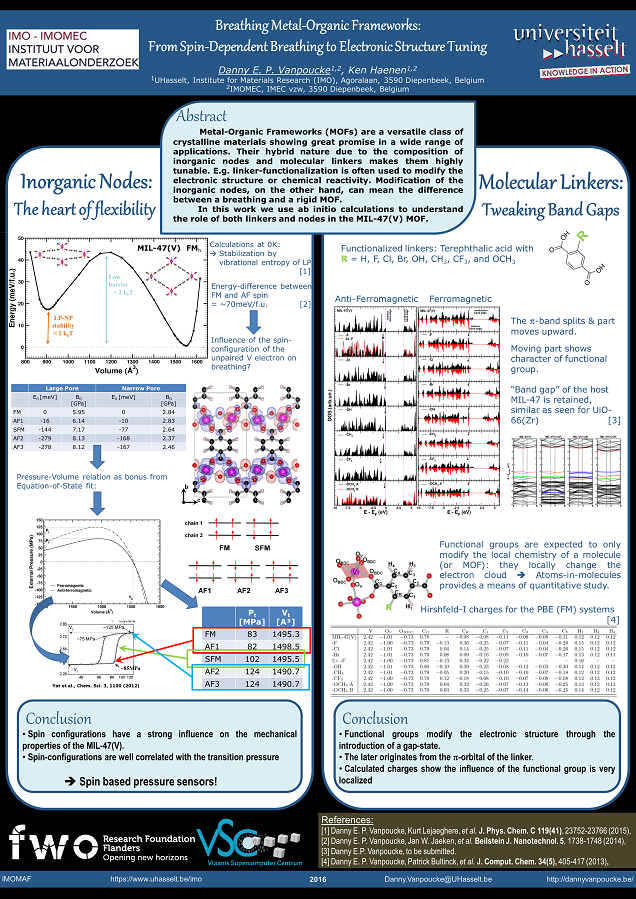
Poster presented at the tUL Life Sciences Research Day, depicting my work on the unfunctionalized and the functionalized MIL-47(V) MOF.
Permanent link to this article: https://dannyvanpoucke.be/tul-life-sciences-research-day-2016/
Sep 25 2016
| Authors: | S. A. Rounaghi, H. Eshghi, S. Scudino, A. Vyalikh, D. E. P. Vanpoucke, W. Gruner, S. Oswald, A. R. Kiani Rashid, M. Samadi Khoshkhoo, U. Scheler and J. Eckert |
| Journal: | Scientific Reports 6, 33375 (2016) |
| doi: | 10.1038/srep33375 |
| IF(2016): | 4.259 |
| export: | bibtex |
| pdf: | <Sci.Rep.> (open access) |
Hexagonal Aluminium nitride (h-AlN) is an important wide-bandgap semiconductor material which is conventionally fabricated by high temperature carbothermal reduction of alumina under toxic ammonia atmosphere. Here we report a simple, low cost and potentially scalable mechanochemical procedure for the green synthesis of nanostructured h-AlN from a powder mixture of Aluminium and melamine precursors. A combination of experimental and theoretical techniques has been employed to provide comprehensive mechanistic insights on the reactivity of melamine, solid state metalorganic interactions and the structural transformation of Al to h-AlN under non-equilibrium ball milling conditions. The results reveal that melamine is adsorbed through the amine groups on the Aluminium surface due to the long-range van der Waals forces. The high energy provided by milling leads to the deammoniation of melamine at the initial stages followed by the polymerization and formation of a carbon nitride network, by the decomposition of the amine groups and, finally, by the subsequent diffusion of nitrogen into the Aluminium structure to form h-AlN
Permanent link to this article: https://dannyvanpoucke.be/paper2016_scirepalnitride-en/
Sep 08 2016
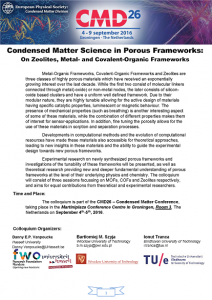 On Monday, we had the second day of our colloquium on Porous Frameworks, containing no less than 4 full sessions, covering all types of frameworks. We started the day with the invited presentation of Prof. Dirk De Vos of the KU Leuven, who discussed the breathing behavior in Zr and Ti containing MOFs, including the work on the COK-69 in which I was involved myself. In the MOFs presented, the breathing behavior was shown to originate from the folding of the linkers, in contrast to breathing due to the hinging motion of the chains in MIL-47/53 MOFs.
After the transition metals, things were stepped up even further by Dr. Stefania Tanase who talked about the use of lanthanide ions in MOFs. These lanthanides give rise to coordinated water molecules which appear to be crucial to their luminescence. Prof. Donglin Jiang, of JAIST in Japan, changed the subject to the realm of COFs, consisting of 2D porous sheets which, through Van Der Waals interactions form 3D structures (similar to graphite). The tunability of these materials would make them well suited for photoconductors and photoenergy conversion (i.e. solar cells).
With Prof. Rochus Schmid of the University of Bochum we delved into the nitty-gritty details of developing Force-Fields for MOFs. He noted that such force-fields can provide good first approximations for structure determination of new MOFs, and if structure related terms are missing in the force-field these will pop up as missing phonon-frequencies.
Prof. Monique Van der Veen showed us how non-polar guest molecules can make a MOF polar, while Agnes Szecsenyi bravely tackled the activity in Iron based MIL-53 MOFs from the DFT point of view. The row of 3 TU Delft contributions was closed by the invited presentation of Prof. Jorge Gascon who provided an overview of the work in his group and discussed how the active sites in MOFs can be improved through cooperative effects.
Prof. Jaroslaw Handzlik provided the last invited contribution, with a comparative theoretical study of Cr-adsorption on various silicate based materials (from amorphous silicate to zeolites). The final session was then closed by the presentations of Dr. Katrine Svane (Bath University) who discussed the effect of defects in UiO-66 MOFs in further detail and Marcus Rose presenting his findings on hyper-crosslinked Polymers, a type of COFs with an amorphous structure and a wide distribution in different pore sizes.
This brought us to a happy end of a successful colloquium, which was celebrated with a drink in the city center of Groningen. Tuesday we traveled back home, such that Wednesday Sylvia could start at the third part of the conference-holiday roller coaster by leaving for Saltzburg.
Permanent link to this article: https://dannyvanpoucke.be/col-mofcofzeo-day2-en/
Sep 04 2016
 Today the CMD26 conference started in Groningen, and with its kick-off also our own 2-day colloquium on porous frameworks (aka MOFs, COFs and Zeolites) was launched. During the two sessions of the day, the focus mainly went out to the Zeolites, with Prof. Emiel Hensen of the Technical university of Eindhoven introducing us to the subject and discussing how new zeolites could be designed in a more rational way. He showed us how the template used during synthesis plays a crucial role in the final growth and structure. Dr. Nakato explained how alkali-metal nanoclusters can undergo insulator to metal transitions when incorporated in zeolites (it is due to the competition between electron-electron repulsion and electron-phonon coupling), while Dr. De Wijs informed us on how Al T-sites need to be ordered and assigned in zeolites to allow for the prediction of NMR parameters.
After the coffee break Dr. Palcic, from the Rudjer Boskovic Institute in Croatia, taught us about the role of heteroatoms in zeolites. She told us that even though more than 2 million theoretical structures exist, only 231 have officially been recognized as having been synthesized, so there is a lot more work to be done. She also showed that to get stable zeolites with pores larger than 7-8 Angstrom one needs to have 3 and 4-membered rings in the structure, since these lead to more rigid configurations. Unfortunately these rings are themselves less stable, and need to be stabilized by different atoms at the T-sites.
Dr. Vandichel, still blushing from his tight traveling scheme, changed the subject from zeolites to MOFs, in providing new understanding in the role of defects in MOFs on their catalytic performance. Dr. Liu changed the subject even further with the introduction of COFs and showing us how Hydrogen atoms migrate through these materials. Using the wisdom of Bruce Lee :
You must be shapeless, formless, like water. When you pour water in a cup, it becomes the cup. When you pour water in a bottle, it becomes the bottle. When you pour water in a teapot, it becomes the teapot.
he clarified how water behaves inside these porous materials. Our first colloquium day was closed by Ir. Rohling, who took us back to the zeolite scene (although he was comparing the zeolites to enzymes). He discussed how reactivity in zeolites can be tweaked by the confinement of the reacting agents, and how this can be used for molecule identification. More importantly he showed how multiple active site collaborate, making chemical reactions much easier than one would expect from single active site models.
After all was said and done, it was time to relax a little during the conference welcome reception. And now time to prepare for tomorrow, day 2 of our colloquium on porous frameworks.
Permanent link to this article: https://dannyvanpoucke.be/col-mofcofzeo-day1-en/
Aug 31 2016

Visit to Stockholm. The knight at the Medeltidsmuseet (top left), brown bear in Skansen (top right), visiting the Royal palace (bottom left) and local entertainment in the old city center (bottom right).
Summertime is a time of rest for most people. For our little academic family, last summer was a bit of a roller coaster; alternating holidays with hard work which had been postponed too much. The last vestige of my start of a new chapter (moving the remaining stuff from the apartment to our house) was finally bested. Now the conference roller coaster has started with Sylvia’s plenary lecture on conceptual spaces in Stockholm.
As neither of us ever visited Sweden before, we decided to turn it into a semi-family-holiday as well. Our 4-year-old son enjoyed his first ever plane flight (he wasn’t really convinced something impressive was going on). And while Sylvia was of to the conference, the two of us went to explore Stockholm: Finding the knight in the Medeltidsmuseet (at the left in the back of this beautiful museum 🙂 ) and searching for the king and queen at their palace (they weren’t there 🙁 ). Or visiting one of the oldest open-air musea; Skansen (similar to Bokrijk in Belgium) where we saw old professions at work (making cheese for example) and native Scandinavian farm and wild animals (from peacocks to brown bears).
Next weekend starts the next episode of the conference roller-coaster with me hosting a 2-day colloquium on porous frameworks together with Bartek Szyja and Ionut Tranca at the CMD-26 conference in Groningen. We have a nicely packed colloquium with about 20 presentations (8 invited and 12 contributed) covering the whole realm of porous materials from zeolites to COFs and MOFs. The program of the colloquium can be downloaded below: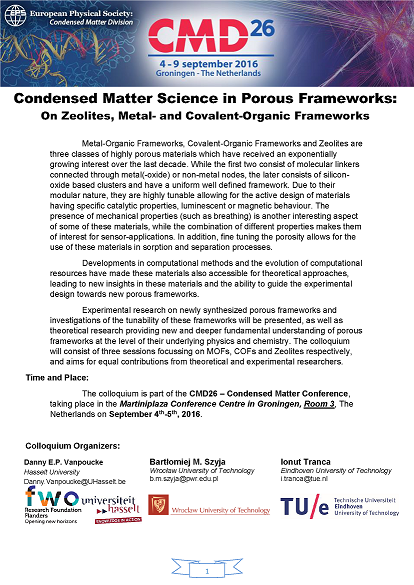
Permanent link to this article: https://dannyvanpoucke.be/holiday-conference-rollercoaster-en/
Jul 14 2016
 The first PC we got at our home was a Pentium II. My dad got it, because I was going to university, and I would be able to do something “useful” with it. (Yup, I survived my entire high school career searching stuff in the library and the home encyclopedia. Even more, Google didn’t even exist before we got our computer, as the company was only founded in 1998 🙂 ). The machine was advertised as state of the art with a clock rate of a whooping 233 MHz! During the decade that followed, the evolution of the clock rates kept going at a steady pace, until it saturated at about 3-4 GHz(15 times faster than the 233 MHz) around 2005. Since then, the clock rate has not increased a bit. If anything, the average clock rate has even decreased to the range 2-3 GHz. As power-consumption grows quadratically with with the clock rate, this means that (1) there is much more heat produced, that needs to be transported away from your CPU (otherwise it get’s destroyed), (2) reducing the clock rate by a factor 2, allows you to power 4 CPU’s at half the clock rate, effectively doubling your calculation power. (There are even more tricks involved in modern CPU’s which crack up performance such that the clock rate isn’t a real measure for performance any longer, and sales people need to learn more new buzzword to sell your computer/laptop 👿 )
 Where in 2005 you bought a single CPU with a high clock rate, you now get a machine with multiple cores. Most machines you can get these days have a minimum of 2 cores, with quad-core machines becoming more and more common. But, there is always a but, even though you now have access to multiple times the processing power of 2005, this does not mean that your own code will be able to use it. Unfortunately there is no simple compiler switch which makes your code parallel (like the -m64 switch which makes your code 64-bit), you have to do this yourself (the free lunch is over). Two commonly used frameworks for this task are OpenMP and MPI. The former mainly focuses on shared memory configurations (laptops, desktops, single nodes in a cluster), while the latter focuses of large distributed memory setups (multi-node clusters) and is thus well-suited for creating codes that need to run on hundreds or even thousands of CPU’s. The two frameworks differ significantly in their complexity, fortunately for us, OpenMP is both the easier one, and the one most suited for a modern multi-core computer. The OpenMP framework consists of pragma’s (or directives) which can be added in an existing code as comment lines, and tell a compiler knowledgeable of OpenMP how to parallelize the code. (It is interesting to note that MPI and OpenMP are inteded for parallel programming in either C, C++ or fortran … a hint that what the important programming languages are.)
As most modern fortran compilers also are well aware of openMP (you can check which version of openMP is supported here), you generally will not need to install a new compiler to write parallel fortran code. You only need to add a single compiler flag: -fopenmp (gcc/gfortran), -openmp (intel compiler), or -mp (Portland Group). In Code::Blocks you will find this option under Settings > Compiler > Compiler Settings tab > Compiler Flags tab (If the option isn’t present try adding it to “other compiler options” and hope your compiler recognizes one of the flags).
Secondly, you need to link in the OpenMP library. In Code::Blocks go to Settings > Compiler > Linker Settings tab > Link Libraries: add. Where you add the libgomp.dll.a library (generally found in the folder of your compiler…in case of 64 bit compilers, make sure you get the 64 bit version)
Finally, you may want to get access to OpenMP functions inside your code. This can be achieved by a use statement: use omp_lib.
OpenMP contains several functions which allow you to query and set several environment variables (check out these cheat-sheets for OpenMP v3.0 and v4.0).
[codesyntax lang=”fortran” lines=”fancy” container=”div” strict=”yes” title=”Simple OpenMP functions” blockstate=”expanded” highlight_lines=”10,13″]
subroutine OpenMPTest1()
        use omp_lib;

        write(*,*) "Running OpenMP Test 1: Environment variables"
        write(*,*) "Number of threads :",omp_get_num_threads()
        write(*,*) "Number of CPU's available:",omp_get_num_procs()
        call omp_set_num_threads(8) ! set the number of threads to 8
        write(*,*) "#Threads outside the parallel section:",omp_get_num_threads()
        !below we start a parallel section
        !$OMP PARALLEL
        write(*,*) "Number of threads in a parallel section :",omp_get_num_threads()
        write(*,*) "Currently in thread with ID = ",omp_get_thread_num()
        !$OMP END PARALLEL

end subroutine OpenMPTest1
[/codesyntax]
Notice in the example code above that outside the parallel section indicated with the directives $OMP PARALLEL and $OMP END PARALLEL, the program only sees a single thread, while inside the parallel section 8 threads will run (independent of the number of cores available).
The OpenMP frameworks consists of an set of directives which can be used to manage the parallelization of your code (cheat-sheets for OpenMP v3.0 and v4.0). I will not describe them in detail as there exists several very well written and full tutorials on the subject, we’ll just have a look at a quick and easy parallelization of a big for-loop. As said, OpenMP makes use of directives (or Pragma’s) which are placed as comments inside the code. As such they will not interfere with your code when it is compiled as a serial code (i.e. without the -fopenmp compiler flag). The directives are preceded by what is called a sentinel ( $OMP ). In the above example code, we already saw a first directive: PARALLEL. Only inside blocks delimited by this directive, can your code be parallel.
[codesyntax lang=”fortran” lines=”fancy” container=”div” title=”OpenMP second test” highlight_lines=”18,21,29,31″]
subroutine OMPTest2()
        use omp_lib;

        integer :: IDT, NT,nrx,nry,nrz
        doubleprecision, allocatable :: A(:,:,:)
        doubleprecision :: RD(1:1000)
        doubleprecision :: startT, TTime, stt

        call random_seed()
        call random_number(RD(1:1000))
        IDT=500 ! we will make a 500x500x500 matrix
        allocate(A(1:IDT,1:IDT,1:IDT))

        write(*,'(A)') "Number of preferred threads:"
        read(*,*) NT
        call omp_set_num_threads(NT)
        startT=omp_get_wtime()
        !$OMP PARALLEL PRIVATE(stt)
        stt=omp_get_wtime()

        !$OMP DO
        do nrz=1,IDT
           do nry=1,IDT
              do nrx=1,IDT
              A(nrx,nry,nrz)=RD(modulo(nrx+nry+nrz,1000)+1)
              end do
           end do
        end do
        !$OMP END DO
        write(*,*) "time=",(omp_get_wtime()-stt)/omp_get_wtick()," ticks for thread ",omp_get_thread_num()
        !$OMP END PARALLEL
        TTime=(omp_get_wtime()-startT)/omp_get_wtick()
        write(*,*)" CPU-resources:",Ttime," ticks."

        deallocate(A)
    end subroutine RunTest2
[/codesyntax]
The program above fills up a large 3D array with random values taken from a predetermined list. The user is asked to set the number of threads (lines 14-16), and the function omp_get_wtime() is used to obtain the number of seconds since epoch, while the function omp_get_wtick() gives the number of seconds between ticks. These functions can be used to get some timing data for each thread, but also for the entire program. For each thread, the starting time is stored in the variable stt. To protect this variable of being overwritten by each separate thread, this variable is declared as private to the thread (line 18: PRIVATE(stt) ). As a result, each thread will have it’s own private copy of the stt variable.
The DO directive on line 21, tells the compiler that the following loop needs to be parallelized. Putting the !$OMP DO pragma around the outer do-loop has the advantage that it minimizes the overhead produced by the parallelization (i.e. resources required to make local copies of variables, calculating the distribution of the workload over the different threads at the start of the loop, and combining the results at the end of the loop).
As you can see, parallelizing a loop is rather simple. It takes only 4 additional comment lines (!$OMP PARALLEL , !$OMP DO, !$OMP END DO and !$OMP END PARALLEL) and some time figuring out which variables should be private for each thread, i.e. which are the variables that get updated during each cycle of a loop. Loop counters you can even ignore as these are by default considered private. In addition, the number of threads is set on another line giving us 5 new lines of code in total. It is of course possible to go much further, but this is the basis of what you generally need.
Unfortunately, the presented example is not that computationally demanding, so it will be hard to see the full effect of the parallelization. Simply increasing the array size will not resolve this as you will quickly run out of memory. Only with more complex operations in the loop will you clearly see the parallelization. An example of a more complex piece of code is given below (it is part of the phonon-subroutine in HIVE):
[codesyntax lang=”fortran” lines=”fancy” container=”div” title=”Parallel example: Phonon spectra” highlight_lines=”4,5,6,7,11,12,13,15,42,43,44,45,47″]
	!setup work space for lapack
        N = this%DimDynMat
        LWORK = 2*N - 1
        call omp_set_num_threads(this%nthreads)
        chunk=(this%nkz)/(this%nthreads*5)
        chunk=max(chunk,1)
        !$OMP PARALLEL PRIVATE(WORK, RWORK, DM, W, RPart,IO)
        allocate(DM(N,N))
        allocate( WORK(2*LWORK), RWORK(3*N-2), W(N) )
        !the write statement only needs to be done by a single thread, and the other threads do not need to wait for it
        !$OMP SINGLE
        write(uni,'(A,I0,A)') " Loop over all ",this%nkpt," q-points."
        !$OMP END SINGLE NOWAIT
        !we have to loop over all q-points
        !$OMP DO SCHEDULE(DYNAMIC,chunk)
        do nrz=1,this%nkz
            do nry=1,this%nky
                do nrx=1,this%nkx
                    if (this%kpointListBZ1(nrx,nry,nrz)) then
                        !do nrk=1,this%nkpt
                        WORK = 0.0_R_double
                        RWORK = 0.0_R_double
                        DM(1:this%DimDynMat,1:this%DimDynMat)=this%dynmatFIpart(1:this%DimDynMat,1:this%DimDynMat) ! make a local copy
                        do nri=1,this%poscar%nrions
                            do nrj=1,this%poscar%nrions
                                Rpart=cmplx(0.0_R_double,0.0_R_double)
                                do ns=this%vilst(1,nri,nrj),this%vilst(2,nri,nrj)
                                    Rpart=Rpart + exp(i*(dot_product(this%rvlst(1:3,ns),this%kpointList(:,nrx,nry,nrz))))
                                end do
                                Rpart=Rpart/this%mult(nri,nrj)
                                DM(((nri-1)*3)+1:((nri-1)*3)+3,((nrj-1)*3)+1:((nrj-1)*3)+3) = &
                                    & DM(((nri-1)*3)+1:((nri-1)*3)+3,((nrj-1)*3)+1:((nrj-1)*3)+3)*Rpart
                            end do
                        end do
                        call MatrixHermitianize(DM,IOS=IO)
                        call ZHEEV( 'V', 'U', N, DM, N, W, WORK, LWORK, RWORK, IO )
                        this%FullPhonFreqList(:,nrx,nry,nrz)=sign(sqrt(abs(W)),W)*fac
                    end if
                end do
            end do
        end do
        !$OMP END DO
        !$OMP SINGLE
        write(uni,'(A)') " Freeing lapack workspace."
        !$OMP END SINGLE NOWAIT
        deallocate( WORK, RWORK,DM,W )
        !$OP END PARALLEL
[/codesyntax]
In the above code, a set of equations is solved using the LAPACK eigenvalue solver ZHEEV to obtain the energies of the phonon-modes in each point of the Brillouin zone. As the calculation of the eigenvalue spectrum for each point is independent of all other points, this is extremely well-suited for parallelization, so we can add !$OMP PARALLEL and !$OMP END PARALLEL on lines 7 and 47. Inside this parallel section there are several variables which are recycled for every grid point, so we will make them PRIVATE (cf. line 7, most of them are work-arrays for the ZHEEV subroutine).
Lines 12 and 44 both contain a write-statement. Without further action, each thread will perform this write action, and we’ll end up with multiple copies of the same line (Although this will not break your code it will look very sloppy to any user of the code). To circumvent this problem we make use of the !$OMP SINGLE directive. This directive makes sure only 1 thread (the first to arrive) will perform the write action. Unfortunately, the SINGLE block will create an implicit barrier at which all other threads will wait. To prevent this from happening, the NOWAIT clause is added at the end of the block. In this specific case, the NOWAIT clause will have only very limited impact due to the location of the write-statements. But this need not always to be the case.
On line 15 the !$OMP DO pragma indicates a loop will follow that should be parallelized. Again we choose for the outer loop, as to reduce the overhead due to the parallelization procedure. We also tell the compiler how the work should be distributed using the SCHEDULE(TYPE,CHUNK) clause. There are three types of scheduling:
From this real life example, it is again clear that OpenMP parallelization in fortran can be very simple.
On my loyal sidekick (with hyper-threaded quad-core core i7) I was able to get following speedups for the phonon-code (the run was limited to performing only a phonon-DOS calculation):
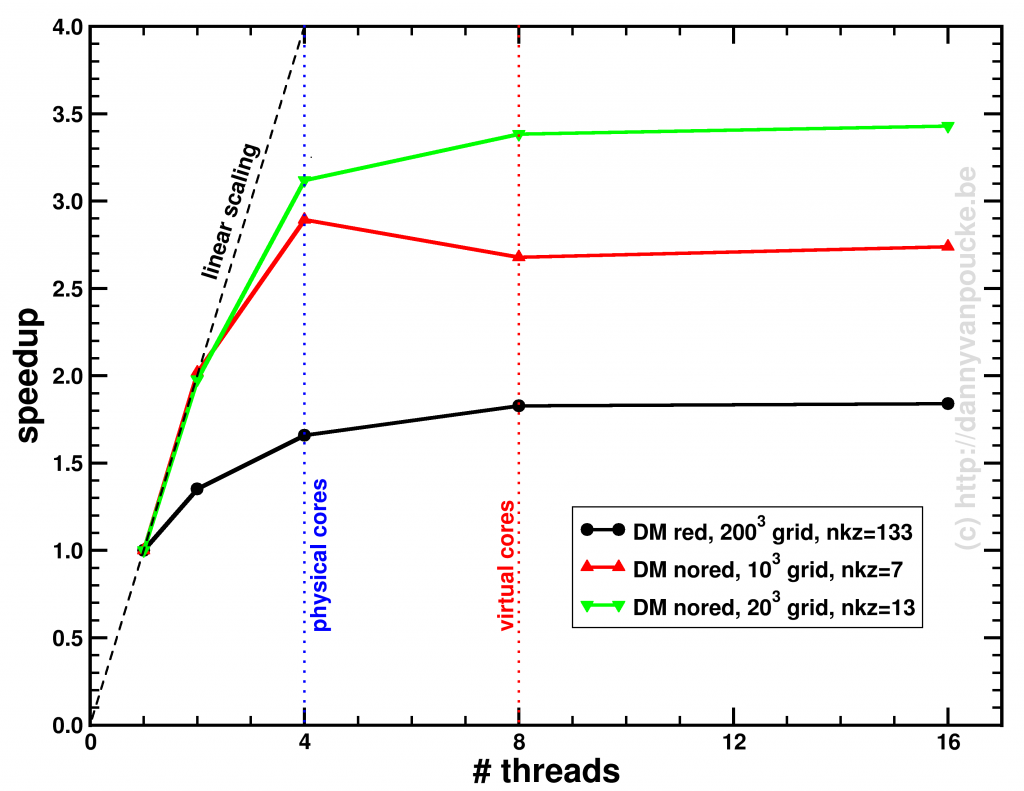
Speedup of the entire phonon-subroutine due to parallelization of the main-phonon-DOS loop.
The above graph shows the speed-up results for the two different modes for calculating the phonon-DOS. The reduced mode (DM red), uses a spectrum reduced to that of a unit-cell, but needs a much denser sampling of the Brillouin zone (second approach), and is shown by the black line. The serial calculation in this specific case only took 96 seconds, and the maximum speedup obtained was about x1.84. The red and green curves give the speedup of the calculation mode which makes use of the super-cell spectrum (DM nored, i.e. much larger matrix to solve), and shows for increasing grid sizes a maximum speedup of x2.74 (serial time: 45 seconds) and x3.43 (serial time 395 seconds) respectively. The reason none of the setups reaches a speedup of 4 (or more) is twofold:
In case of the DM nored calculations, the parallelized loop clearly takes the biggest part of the calculation-time, while for the DM red calculation, also the section generating the q-point grid takes a large fraction of the calculation time limiting the effect of parallelization. An improvement here would be to also parallelize the subroutine generating the grid, but that will be for future work. For now, the expensive DM nored calculations show an acceptable speedup.
Permanent link to this article: https://dannyvanpoucke.be/fortran-openmp1-en/
Jun 30 2016
 “I have a question”(ik heb een vraag). This is the name of a Belgian (Flemisch) website aimed at bringing Flemisch scientists and the general public together through scientific or science related questions. The basic idea is rather simple. Someone has a scientific question and poses it on this website, and a scientist will provide an answer. It is an excellent opportunity for the latter to hone his/her own science communication skills (and do some outreach) and for the former to get an good answer to his/her question.
All questions and answers are collected in a searchable database, which currently contains about fifteen thousand questions answered by a (growing) group of nearly one thousand scientists. This is rather impressive for a region of about 6.5 Million people. I recently joined the group of scientists providing answers.
An interesting materials-related question was posed by Denis (my translation of his question and context):
What is the relation between the density of a material and its thermal expansion?
I was wondering if there exists a relation between the density of a material and the thermal expansion (at the same temperature)? In general, gasses expand more than solids, so can I extend this to the following: Materials with a small density will expand more because the particles are separated more and thus experience a small cohesive force. If this statement is true, then this would imply that a volume of alcohol should expand more than the same volume of air, which I think is puzzling. Can you explain this to me?
Unfortunately there exists no simple relation between the density of a material and its thermal expansion coefficient.
Let us first correct something in the example given: the density of alcohol (or ethanol) is 46.07 g/mol (methanol would be 32.04 g/mol) which is significantly more than the density of air which is 28.96 g/mol. So following the suggested assumption, air should expand more. If we look at liquids, it is better to compare ethanol (0.789 g/cm3) to compare water (1 g/cm3) as liquid air (0.87 g/cm3) needs to be cooled below -196 °C (77K). The thermal expansion coefficients of wtare and ethanol are 207×10-6/°C and 750×10-6/°C, respectively. So in this case, we see that alcohol will expand more than water (at 20°C). Supporting Denis’ statement.
Unfortunately, these are just two simple materials at a very specific temperature for which this statement is true. In reality, there are many interesting aspects complicating life. A few things to keep in mind are:
The way a material expands due to temperature variations is a rather complex combination of different aspects. It depends on how thermal vibrations (or phonons) propagate through the material, but also on the possible presence of phase-transitions. In some materials there are even phase-transitions between solid phases with a different crystal structure. These, just like solid/liquid phase transitions can lead to very sudden jumps in volume during heating or cooling. These different crystal phases can also have very different physical properties. During the middle-ages, tin pest was a large source of worries for organ-builders. At a temperature below 13°C β-tin is more stable α-tin, which is what was used in organ pipes. However, the high activation energy prevents the phase-transformation from α-tin to β-tin to happen too readily. At temperatures of -30 °C and lower this barrier is more easily overcome.This phase-transition gives rise to a volume reduction of 27%. In addition, β-tin is also a brittle material, which easily disintegrates. During the middle ages this lead to the rapid deterioration and collapse of organ-pipes in church organs during strong winters. It is also said to have caused the buttons of the clothing of Napoleon’s troops to disintegrate during his Russian campaign. As a result, the troops’ clothing fell apart during the cold Russian winter, letting many of them freeze to death.
Permanent link to this article: https://dannyvanpoucke.be/ihev-tec-en/
Jun 27 2016
 About a year ago, I discussed the possibility of calculating phonons (the collective vibration of atoms) in the entire Brillouin zone for Metal-Organic Frameworks. Now, one year later, I return to this topic, but this time the subject matter is diamond. In contrast to Metal-Organic Frameworks, the unit-cell of diamond is very small (only 2 atoms). Because a phonon spectrum is calculated through the gradients of forces felt by one atom due to all other atoms, it is clear that within one diamond unit-cell these forces will not be converged. As such, a supercell will be needed to make sure the contribution, due to the most distant atoms, to the experienced forces, are negligible.
Using such a supercell has the unfortunate drawback that the dynamical matrix (which is 


The phonon spectrum at a specific q-point in the first Brillouin zone is given by the square root of the eigenvalues of the dynamical matrix of the system. For simplicity, we first assume a finite system of n atoms (a molecule). In that case, the first Brillouin zone is reduced to a single point q=(0,0,0) and the dynamical matrix looks more or less like the hessian:
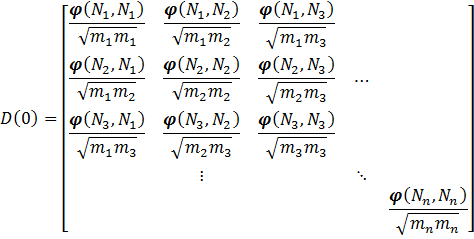
With ![\varphi (N_a,N_b) = [\varphi_{i,j}(N_a , N_b)]](https://s0.wp.com/latex.php?latex=%5Cvarphi+%28N_a%2CN_b%29+%3D+%5B%5Cvarphi_%7Bi%2Cj%7D%28N_a+%2C+N_b%29%5D+&bg=ffffff&fg=000000&s=0 "\varphi (N_a,N_b) = [\varphi_{i,j}(N_a , N_b)]")


When the system under study is no longer a molecule or a finite cluster, but an infinite solid, things get a bit more complicated. For such a solid, we only consider the symmetry in-equivalent atoms (in practice this is often a unit-cell). Because the first Brillouin zone is no longer a single point, one needs to sample multiple different points to get the phonon density-of-states. The role of the q-point is introduced in the dynamical matrix through a factor 
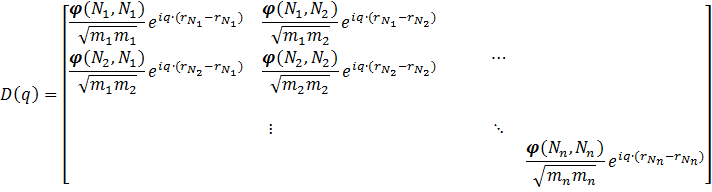
Because a real solid contains more than a single unit-cell, one should also take into account the interactions of the atoms of one unit-cell with those of all other unit-cells in the system, and as such the dynamical matrix becomes a sum of matrices like the one above:
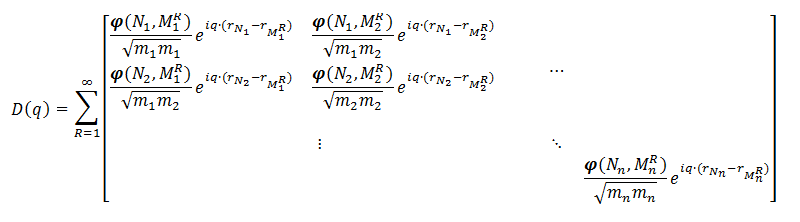
Where the sum runs over all unit-cells in the system, and Ni indicates an atom in a specific reference unit-cell, and MRi an atom in the Rth unit-cells, for which we give index 1 to the reference unit-cell. As the forces decay with the distance between the atoms, the infinite sum can be truncated. For a Metal-Organic Framework a unit-cell will quite often suffice. For diamond, however, a larger cell is needed.
An interesting aspect to the dynamical matrix above is that all matrix-elements for a sum over n unit-cells are also present in a single dynamical matrix for a supercell containing these n unit-cells. It becomes even more interesting if one notices that due to translational symmetry one does not need to calculate all elements of the entire supercell dynamical matrix to construct the full supercell dynamical matrix.
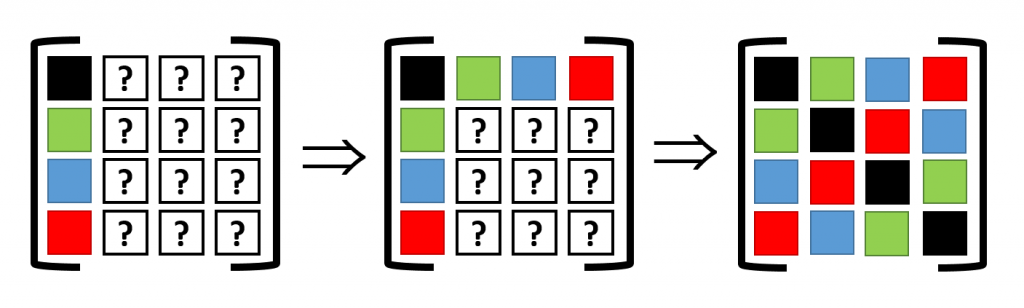
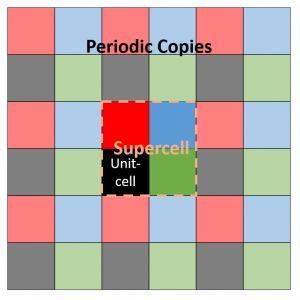 Assume a 2D 2×2 supercell with only a single atom present, which we represent as in the figure on the right. A single periodic copy of the supercell is added in each direction. The dynamical matrix for the supercell can now be constructed as follows: Calculate the elements of the first column (i.e. the gradient of the force felt by the atom in the reference unit-cell, in black, due to the atoms in each of the unit-cells in the supercell). Due to Newton’s third law (action = reaction), this first column and row will have the same elements (middle panel).
Translational symmetry on the other hand will allow us to determine all other elements. The most simple are the diagonal elements, which represent the self-interaction (so all are black squares). The other you can just as easily determine by looking at the schematic representation of the supercell under periodic boundary conditions. For example, to find the derivative of the force on the second cell (=second column, green square in supercell) due to the third cell (third row, blue square in supercell), we look at the square in the same relative position of the blue square to the green square, when starting from the black square: which is the red square (If you read this a couple of times it will start to make sense). Like this, the dynamical matrix of the entire supercell can be constructed.
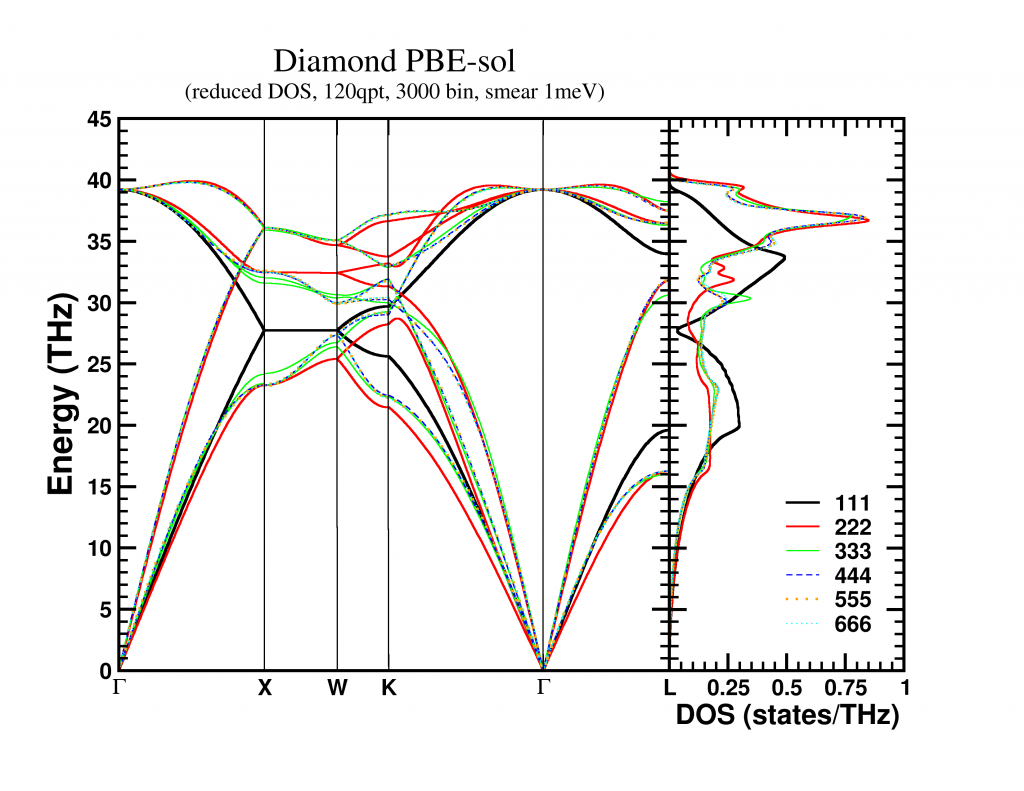
This final supercell dynamical matrix can, with the same ease, be folded back into the sum of unit-cell dynamical matrices (it becomes an extended lookup-table). The resulting unit-cell dynamical matrix can then be used to create a band structure, which in my case was nicely converged for a 4x4x4 supercell. The bandstructure along high symmetry lines is shown below, but remember that these are actually 3D surfaces. A nice video of the evolution of the first acoustic band (i.e. lowest band) as function of its energy can be found here.
The phonon density of states can also be obtained in two ways, which should, in contrast to the band structure, give the exact same result: (for an
In the end, the choice will be based on whether you are limited by the accessible memory (when running a 32-bit application, the number of q-point will be detrimental) or CPU-time (solving the dynamical matrix quickly becomes very expensive).
Permanent link to this article: https://dannyvanpoucke.be/folding-phonons/
Jun 19 2016
Current day computers generally have 64-bit processors, and most even have 64-bit operating systems. On such systems, 32-bit programs will run fine, but 64-bit programs can make more efficient use of the underlying system. When we installed a fortran compiler and the code::blocks IDE, the default fortran compiler generated 32-bit programs. This generally is not an issue, unless you need a large amount of memory, for example to store a temporary array with 4003 double precision coordinates (as I did for a project I’m currently working on). You may first start to look for ways of increasing the stack-size of your program, but you will soon discover that the problem is more profound: a 32-bit program cannot access address spacing beyond 4Gb. (In practice, generally you will not even reach 4Gb before running into problems.) This is because the memory address of your data is stored as a 32-bit value (232 = 4 294 967 296 = 4Gb) so the only way out of this predicament is a “larger address” aka 64-bit. So you need to install a new compiler capable of providing 64-bit programs.
Permanent link to this article: https://dannyvanpoucke.be/install-fortran64bit-en/
May 29 2016
Over the past few weeks I have bumped into several issues each tracing back to numerical accuracy. Although I have been programming for almost two decades I never had to worry much about this, making these events seem as-if the universe is trying to tell me something.
Now, let me try to give a proper start to this story; Computational (materials) research is generally perceived as a subset of theoretical (materials) research, and it is true that such a case can be made. It is, however, also true that such thinking can trap us (i.e. the average computational physicist/chemist/mathematician/… programming his/her own code) with numerical accuracy problems. While theoretical equations use exact values for numbers, a computer program is limited by the numerical precision of the variables (e.g. single, double or quadruple precision for real numbers) used in the program. This means that actual numbers with a larger precision are truncated or rounded to the precision of the variable (e.g. 1/3 becomes 0.3333333 instead of 0.333… with an infinite series of 3’s). Most of the time, this is sufficient, and nothing strange will happen. Even more, most of the time, the additional digits would only increase the computational cost while not improving the results in a significant fashion.
To understand the importance, or the lack thereof, of additional significant digits, let us first have a look at the precision of 


Knowing this, our mind is quickly put at easy regarding possible issues regarding numerical accuracy. However, once in a while we run into one exceptional case (or three, in my case).
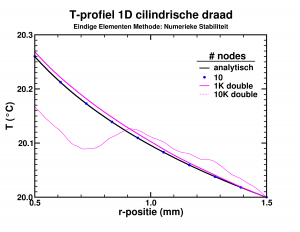
Temperature profile in the insulating layer of a cylindrical wire.
While looking into the theory behind finite elements, I had some fun implementing a simple program which calculated the temperature distribution due to heat transport in an insulating layer. The finite element approach performed rather nicely, leading to good approximate results, already for a few dozen elements. However, I wanted to push the implementation a bit (the limit of infinite elements should give the exact solution). Since the set of equations was solved by a LAPACK subroutine, using 10 000 elements instead of 10 barely impacted the required time (writing the results took most of 2-3 seconds anyway). The results on the other hand were quite funny as you can see in the picture. The initial implementation, with single precision variables, breaks down even worse already at 1000 elements. Apparently the elements had become too small leading to too small variations of the properties in the stiffness-matrix, resulting in the LAPACK subroutine returning nonsense.
So it turns out that you can have too many elements in a finite elements method.
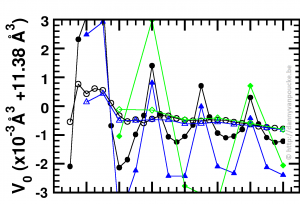
Optimized volume in Equation of State fit, as function of the range of the fitting data, and step size between data-points. green diamonds, blue triangles and black discs: 1% , 0.5% and 0.25% volume steps respectively.
Recently, I started working at the Wide Band Gap Materials group at the University of Hasselt. So in addition to MOFs I am also working on diamond based materials. While setting up a series of reference calculations, using scripts which already suited me well during my work on MOFs, I was trying to figure out for which volume range, and step size I would get a sufficient convergence in my Equation-of-States Fitting procedure. For the MOFs this is a computationally rather expensive (and tedious) exercise, which, fortunately, gives clear results. For the 2-atom diamond unit cell the calculations are ridiculously fast (in comparison), but the results were confusing. As you can see in the picture, the values I obtained from the different fits seem to oscillate. Checking my E(V) data showed nothing out of the ordinary. All energies and volumes were clearly distinguishable, with the energies given with a precision of 0.001 meV, and the volumes with a precision of 0.01 Å3. However, as you can see in the figure, the volume-oscillations are of the order of 0.001 Å3, ten times smaller than our input precision. Calculating the volumes based on the lattice parameters to get a precision of 10-6 Å3 for the input volumes stabilizes the convergence behavior of the fits (open symbols in the figure). This problem was not present with the MOFs since these have a unit cell volume which is one hundred times larger, so a precision of 0.01 Å3 makes the relative error on the volumes one hundred times smaller than was the case for diamond.
In essence, I was trying to get more accurate output than the input I provided, which will never give sensible results (even if they actually look sensible).
The last one is a bit embarrassing as it lead to a bug in the HIVE-toolbox, which is fixed in the mean time.
One of the HIVE-toolbox users informed me that the dosgrabber routine had crashed because it could not find the Fermi-level in the output of a VASP calculation. Although VASP itself gives a value for the Fermi-level, I do not use it in the above sub-program, since this value tend to be incorrect for spin-polarized systems with different minority and majority spins. However, in an attempt to be smart (and efficient) I ended up in trouble. The basic idea behind my Fermi-level search is just running through the entire Density of States-spectrum until you have counted for all the electrons in the system. Because the VASP estimate for the Fermi-level is not that far of, you do not need to run through the entire list of several thousand entries, but you could just take a subset-centered around the estimated Fermi-level and check in that subset, speeding this up by a factor of 10 to 100. Unfortunately I calculated the energy step size between density of states entries as the difference between the first two entries, which are given to with an accuracy of 0.001 eV. I guess you already have a feeling what will be the problem. When the index of the estimated Fermi-level is 1000, the error will be of the order of 1 eV, which is much larger than the range I took into account. Fortunately, the problem is easily solved by calculating the energy step size as the difference between the first and last index, and divide by the number of steps, making the error in the particular case more than a thousand times smaller.
So, trying to be smart, you always need to make sure you really are being smart, and remember that small number can become very big when there are a lot of them.
Permanent link to this article: https://dannyvanpoucke.be/one-more-digit-of-importance-en/